Can you find your way in code you didn't write?
2026-09-24
A year and a half ago, most developers probably saw AI as a very advanced form of autocomplete. You dictated the code, and AI helped you type it faster. That has changed quickly. We've now reached the point where an LLM can realistically write most of the code for a feature, and a developer doesn't have to correct much afterwards.
That doesn't mean AI-generated code is ready for production by default. AI produces code, but it still doesn't see the bigger picture. It does raise an interesting question, though.
The context you used to get for free
Until recently, most of the time spent on a feature went into writing the code. By code I don't just mean the lines themselves. You also thought about the folder structure, the file names and the function names. All that work built up a strong mental context. You knew what your code did, and you also knew exactly how it worked, because you had written every piece of it yourself.
Developers still spend a lot of time with their code. But I expect we spend less time per feature now, because AI can write most of it. We still know what the code does. We may no longer know exactly how it does it.
So the question becomes: how does a developer find their way in code they didn't (fully) write themselves?
An old problem in a new setting
The answer has been around for a long time. It's the same situation as taking over a project from a colleague. Someone else made the decisions, and now you have to understand the result.
One way to tackle this is what Robert C. Martin (Uncle Bob) called "Screaming Architecture" in 2011. The idea behind it is even older: organise code by feature instead of by technical layer. This is also known as vertical slicing or package by feature.
What does your codebase scream?
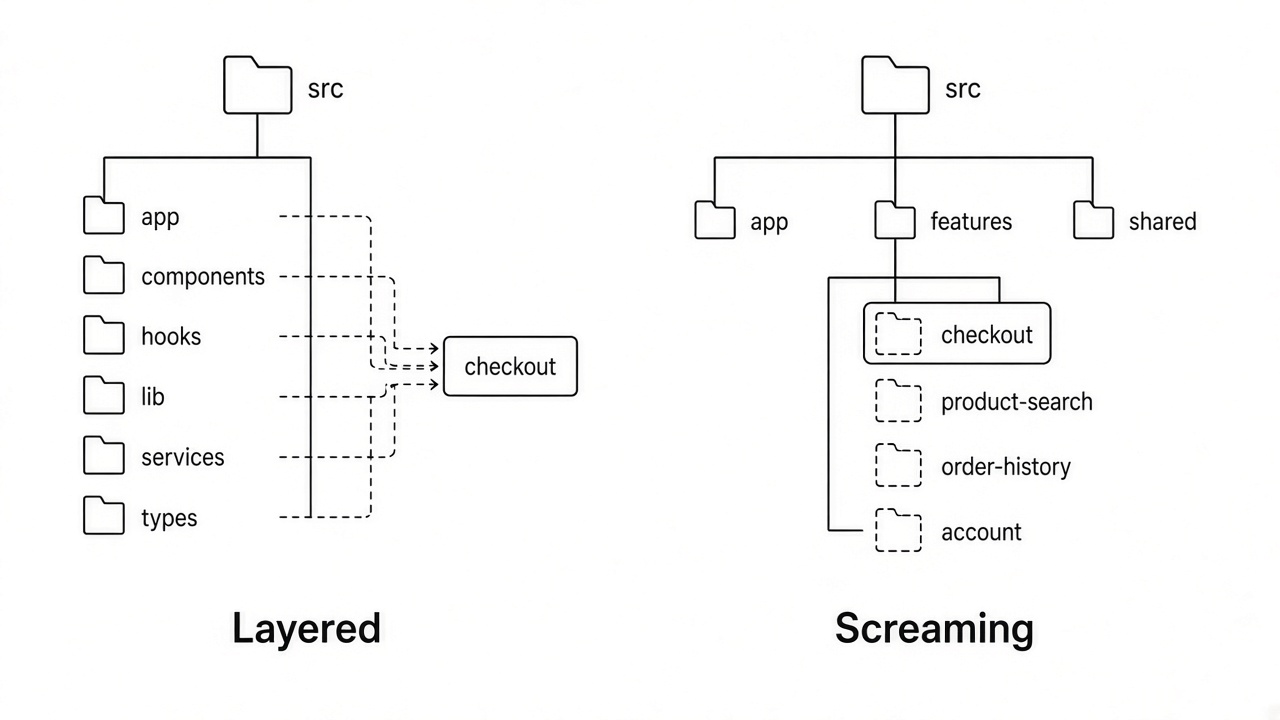
Most codebases use technical layering. The folder structure is based on the technology. A typical Next.js project looks something like this:
src/
  app/
  components/
  hooks/
  lib/
  services/
  types/
This project screams "I'm a Next.js project". It doesn't tell you what the application does.
If you work in a codebase like this with AI, the AI will simply follow the existing structure. A new feature ends up spread across components, hooks, services and types. Later, when you need to understand how that feature works, you have to open four or five folders and piece it together yourself. That's a waste of time, especially for code you didn't write.
Screaming architecture turns this around. Your folder structure should scream what the application does:
src/
  app/              (routing only)
  features/
    checkout/
      components/
      hooks/
      checkout-service.ts
    product-search/
    order-history/
    account/
  shared/
All Next.js projects look like Next.js projects, so the framework doesn't set them apart. Their features do.
Why this matters more with AI
This structure helps in two directions. It helps you: open the checkout folder and everything about checkout is there, including the code AI wrote last week. It also helps the AI. An AI assistant follows the patterns it finds, so in a feature-based structure it puts new checkout code in the checkout folder instead of scattering it across the codebase. The same structure guides both the developer and the AI.
It also gives you a natural boundary. A feature folder is a clear scope when you give AI a task, and a clear scope when you review what it produced.
Conclusion
The way we write code has changed, but the challenge of understanding someone else's code hasn't. The difference is that the "someone else" is now often an AI.
Screaming architecture used to help a colleague understand your project. Now it helps you understand code you didn't write yourself. The more of your code AI writes, the more your structure has to explain.
So take a look at the folder structure of your current project. What does it scream?